-{"name":"BOS","tagline":"BOS - a small x86 operating system written in Assembly","body":"### Welcome to BOS Github page.\r\nBOS official webpage with forums can be found at [BOS](http://bos.asmhackers.net/). On this page I'll just provide a quickstart for how to try BOS. I'm basing this on OSX, but should be similar for *nix, and the repository has a .bat script for Windows.\r\n\r\n\r\n### Getting the OS image file\r\nHere I'll provide links to the newest available BOS images for direct testing:\r\n[1.44MB floppy image](https://github.com/bubach/BOS/raw/master/bos.img)\r\n\r\nThe image was created on my OSX setup with these commands, using the Homebrew `brew install mtools` package.\r\n```\r\n$ mformat -C -f 1440 -v BOS -i ./bos.img ::\r\n$ hdiutil attach ./bos.img\r\n$ cp ./kernel/kernel.sys /Volumes/BOS\r\n$ umount /Volumes/BOS\r\n$ dd if=./boot/BOS_boot.bin of=/dev/disk1 bs=1 count=512\r\n$ hdiutil detach /dev/disk1\r\n$ chmod 0777 ./bos.img\r\n```\r\n\r\n### Testing the OS\r\nTo test the OS you will need Bochs, Qemu or a physical floppy driver in your desktop computer. Bochs can be downloaded on OSX with homebrew by first getting the X11 `xquartz` package. After that is installed, run:\r\n\r\n```\r\n$ brew install homebrew/x11/bochs\r\n$ bochs -f ./doc/bochsrc-osx.txt\r\n````\r\n\r\n### Commands\r\nRight now there isn't much you can do in BOS. The available commands will be listed by typing `help` followed by ENTER. As development goes on, I will go into more detail here.\r\n\r\n### Roadmap and goals\r\nAfter several years with not much happening, I'm now back and fully committed on getting the next version of BOS released - which will focus mainly on a VFS (Virtual File System) abstraction layer for keeping track of storgage devices and filesystems. Next release will feature the VFS with the updated floppy driver and FAT12 support.\r\n\r\n### Contribute\r\nAll contributions are welcomed. Be sure to visit the forums first, and announce what you might want to help out with, and then you create pull requests on Github.\r\n\r\n### Support or Contact\r\nHaving trouble? Check out the BOS forums at https://bos.asmhackers.net/forum and we’ll help you sort it out.","google":"","note":"Don't delete this file! It's used internally to help with page regeneration."}
\ No newline at end of file
+{"name":"BOS","tagline":"BOS - a small x86 operating system written in Assembly","body":"### Welcome to BOS Github page.\r\nBOS official webpage with forums can be found at [BOS](http://bos.asmhackers.net/). On this page I'll just provide a quickstart for how to try BOS. I'm basing this on OSX, but should be similar for *nix, and the repository has a .bat script for Windows.\r\n\r\n\r\n### Getting the OS image file\r\nHere I'll provide links to the newest available BOS images for direct testing:\r\n[1.44MB floppy image](https://github.com/bubach/BOS/raw/master/bos.img)\r\n\r\nThe image was created on my OSX setup with these commands, using the Homebrew `brew install mtools` package.\r\n```\r\n$ mformat -C -f 1440 -v BOS -i ./bos.img ::\r\n$ hdiutil attach ./bos.img\r\n$ cp ./kernel/kernel.sys /Volumes/BOS\r\n$ umount /Volumes/BOS\r\n$ dd if=./boot/BOS_boot.bin of=/dev/disk1 bs=1 count=512\r\n$ hdiutil detach /dev/disk1\r\n$ chmod 0777 ./bos.img\r\n```\r\n\r\n\r\n### Testing the OS\r\nTo test the OS you will need Bochs, Qemu or a physical floppy driver in your desktop computer. Bochs can be downloaded on OSX with homebrew by first getting the X11 `xquartz` package. After that is installed, run:\r\n\r\n```\r\n$ brew install homebrew/x11/bochs\r\n$ bochs -f ./doc/bochsrc-osx.txt\r\n````\r\n\r\nWhen the OS has booted it will look something like this\r\n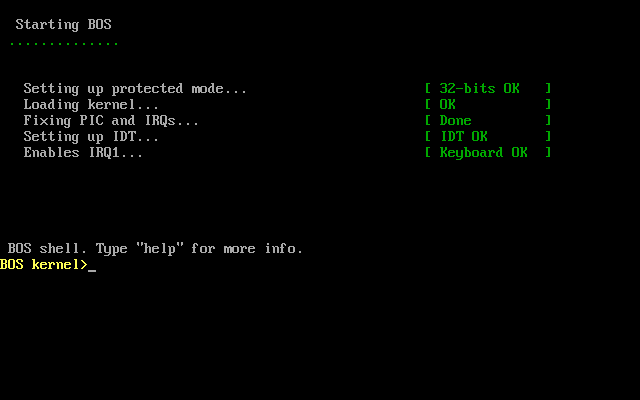\r\n\r\n\r\n### Commands\r\nRight now there isn't much you can do in BOS. The available commands will be listed by typing `help` followed by ENTER. As development goes on, I will go into more detail here.\r\n\r\n\r\n### Roadmap and goals\r\nAfter several years with not much happening, I'm now back and fully committed on getting the next version of BOS released - which will focus mainly on a VFS (Virtual File System) abstraction layer for keeping track of storgage devices and filesystems. Next release will feature the VFS with the updated floppy driver and FAT12 support.\r\n\r\n\r\n### Contribute\r\nAll contributions are welcomed. Be sure to visit the forums first, and announce what you might want to help out with, and then you create pull requests on Github.\r\n\r\n\r\n### Support or Contact\r\nHaving trouble? Check out the BOS forums at https://bos.asmhackers.net/forum and we’ll help you sort it out.","google":"","note":"Don't delete this file! It's used internally to help with page regeneration."}
\ No newline at end of file
 projects / BOS.git / commitdiff